MyManager
  • HOME
  • PRODUCT
    • BENEFITS
    • FEATURES
    • PACKAGES
    • SECURITY
    • PROCESS FLOW
    • PRODUCT TOUR
    • FAQs
    • Help
  • PRICING
  • Knowledge Center
    • Personal Performance Indices
    • Productivity Indices
    • Inefficiency Factors
    • Why SaaS?
  • BLOG
  • GALLERY
  • CONTACT US

Tracking Expiry Dates

1. Rollover the cursor on Store tab at left menu bar and click.

2. Click on Expiration.

3. The list of the materials to be expired within 3 months will be displayed.

4. Click on the desired time period button (e.g.,Within 2 Months, Within 1 Month etc.) to check the relevant materials list.

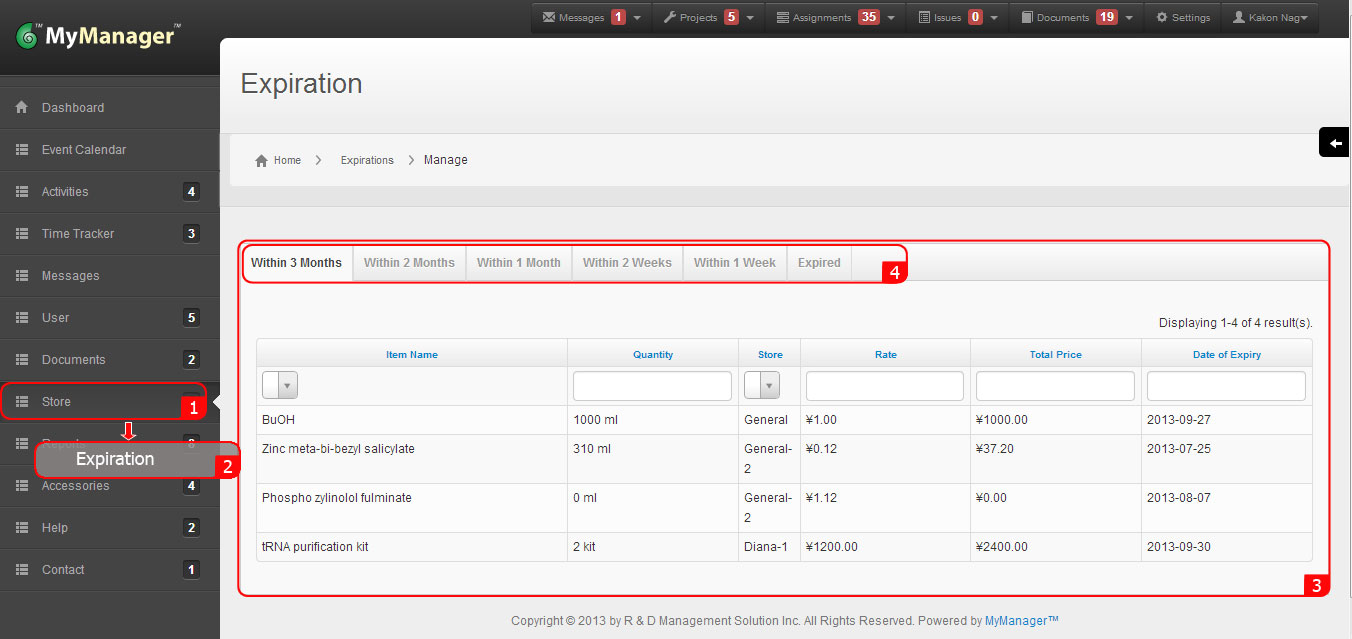
tracking_expiry_dates-3

Guide Menu

Primary Setting
  • Primary Setting
  • Quick Start-up Guide
Event Calender
  • Event Calender
Activities
  • Projects
  • Assignments
Time Tracker
  • Time Tracker
Message
  • Message
Users
  • Users
  • Users Group
  • Manage Users Group Access
Documents
  • Document
Store
  • Tracking Expiry Dates
  • Store Setting
  • Purchase
  • Requisition
Reports
  • Reports
Accessories
  • User Footprints
  • Booking
  • Client Information Portal
  • About Us
  • Privacy Policy
  • Terms of Uses
  • Partners